Installing Hard drive
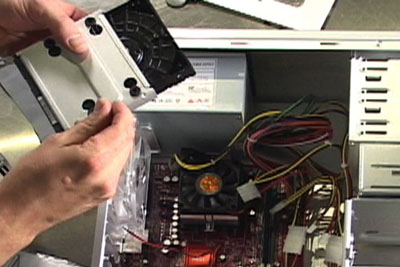 First off for some of you with the tall towers you may have to remove the left side panel off the tower. For the rest of you, there should be a tray of some kind that you can remove
from your case to install your harddrive to. Sometimes the tray is held in place by just a clip, or sometimes its held by 2 screws. For my case I have a tray that is held in place
by a push clip and slides out. Remove the tray. If you have an IDE/PATA hard drive there is a slot on the back with small jumpers to designate master or slave drives. From factory
they are normally set to master. Read your owners manual that came with the drive for proper settings to know how yours is to be set. If you bought a SATA drive you don't need to
worry about it. The SATA motherboards will auto select this feature. Slide the harddrive into it placing the plug connect side toward the motherboard side of the tray.
First off for some of you with the tall towers you may have to remove the left side panel off the tower. For the rest of you, there should be a tray of some kind that you can remove
from your case to install your harddrive to. Sometimes the tray is held in place by just a clip, or sometimes its held by 2 screws. For my case I have a tray that is held in place
by a push clip and slides out. Remove the tray. If you have an IDE/PATA hard drive there is a slot on the back with small jumpers to designate master or slave drives. From factory
they are normally set to master. Read your owners manual that came with the drive for proper settings to know how yours is to be set. If you bought a SATA drive you don't need to
worry about it. The SATA motherboards will auto select this feature. Slide the harddrive into it placing the plug connect side toward the motherboard side of the tray.
Secure the hard drive in place using 4 screws (provided with new hard drive) in the bottom or side slots in the tray. Reinstall the tray into your case like it was before. The hard drive is installed.
Installing CD/DVD Rom
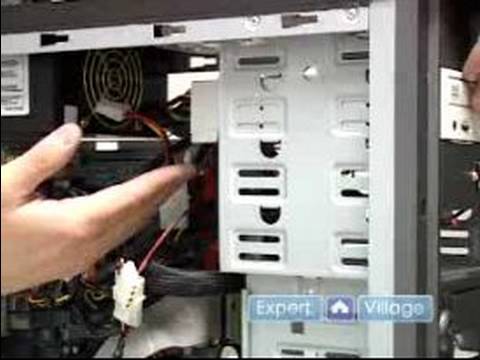 Locate what bay you want to install your CD/DVD rom into. Remove the front cover by pushing it from the back. They are normally pretty stuck so you may have to use a small
screwdriver and pry it over while you push.
Locate what bay you want to install your CD/DVD rom into. Remove the front cover by pushing it from the back. They are normally pretty stuck so you may have to use a small
screwdriver and pry it over while you push.
Just like the hard drive check the jumper settings on your new drive. Verify with the owners manual if you have any questions. Slide your new CD/DVD rom into the empty face slot of your machine till the front is flush with the case. There should be some guides inside to help hold the drive up in the back while you slide it in. They keep the drive from falling at an angle for you. Now secure the drive with 4 screws (2 on each side). The drive is installed.
Installing Floppy drive
Locate the bay you want the floppy drive to be installed in, and follow the same proceedure for this as the CD/DVD rom drive. Don't worry about the jumper settings. There are no jumpers to be set.