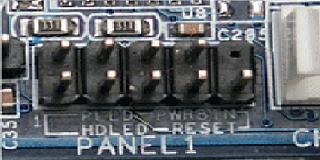
 First off lets connect the front panel to the motherboard.
Most motherboards have a connector that looks like the image to the right.
Refer to your motherboard manual for proper connections. In this instance the lower left pin is number one.
Always remember the white wires are neutral or ground and the colored wires go on the + pin.
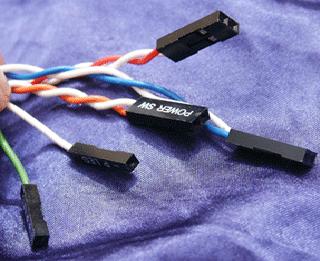 The pic to the right is an example of what your wire connectors will look like.
Look on your motherboard and you will find another plug that looks like the same as the front panel plug but it will say USB or USB#. Most cases come with front USB plugs that are already wired up in the plug so all you have to do is plug them into the connector. Be sure you plug them in correctly and not upside down.
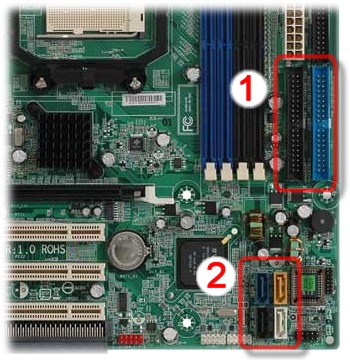 To the right you will see # 1 IDE and # 2 SATA connectors. We will now connect all media devices.
It is easier to connect the closer items first. At which in most cases is the harddrive. In my case I am using a SATA hard drive. Connect one end of the cable to the hard drive, which is the thinner connector on the drive. And connect the other end of the cable to any of the SATA ports on the motherboard. If you have a SATA DVD rom then do the same for it.
If you have an IDE DVD rom like myself then connect one end of the connector to the back of the DVD rom. If you look at the connector there are 2 groves on one side in the middle. Align these grooves with the cutouts in the drive itself. And connect the other end to the motherboard aligning the groove with that connector too.
If you actually installed a floppy drive then connect it to the ribbon supplied with your motherboard for it. Notice the ribon for the floppy is not as wide as the standard IDE cable.
Now plug your power connectors into each of your drives. If the drive has IDE then one corner of the plug is cut at an angle, and for sata drives it only goes one way.
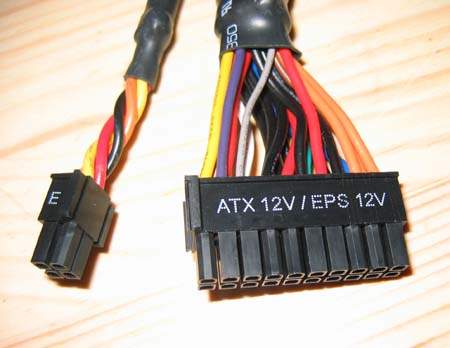 Now connect the ATX power cord to your motherboard. Some are 20 pin and some are 24 pin. If you have a 20 pin connector on the board, then look around the video card area
and see if there is another 6 pin connector there. If there is then plug up your 6 pin connector. That plug is for extra power to supply your video graphics card.
Now connect the ATX power cord to your motherboard. Some are 20 pin and some are 24 pin. If you have a 20 pin connector on the board, then look around the video card area
and see if there is another 6 pin connector there. If there is then plug up your 6 pin connector. That plug is for extra power to supply your video graphics card. Now is the time to plug in all of your accessories such as any cooling fans you have installed, any LED lights you have installed.
Now lets clean up all the wiring you have put into this thing. I recommend using mini zip ties or pull through bread ties. That way if you are having problems later and you suspect a bad cable you can remove them fairly easy with minimal effort. Pull all excess power cables up and tie them off to the frame of your case. And for your ribbon cables you should be able to fold and tuck them into open areas within around your drives. SATA cables the same thing but if you prefer pull the excess and fold it and tie it with your bread tie/mini zip tie. Make sure that you tie all cables to the inside of your case you don't want any getting pinched while putting the cover back on.
Now reinstall the case cover or covers that you have removed for the installation of all the internal components. And sit back, take a deep breath, the easy part is finished.
Ok so you have just built a computer. For some you should be proud. For others you should be ashamed. Yes and you know who you are!
The next step is to connect all your external components and power it up and install an operating system. Due to time restraints on this project I did not get that far. But on my website gizzylive.com/project2 I promise to finish this to the end and leave it posted. Feel free to go to gizzylive.com from time to time and say howdy.